
Build DJ mixes from your bedroom with a visual timeline, transition editing, stems, effects and export tools made for home practice.
DJ.Studio helps bedroom DJs turn playlists into structured mixes. Arrange tracks, test transitions, create edits, record voice-overs and export finished sets without needing to perform every move live in real time.
Free trial available. No credit card required.
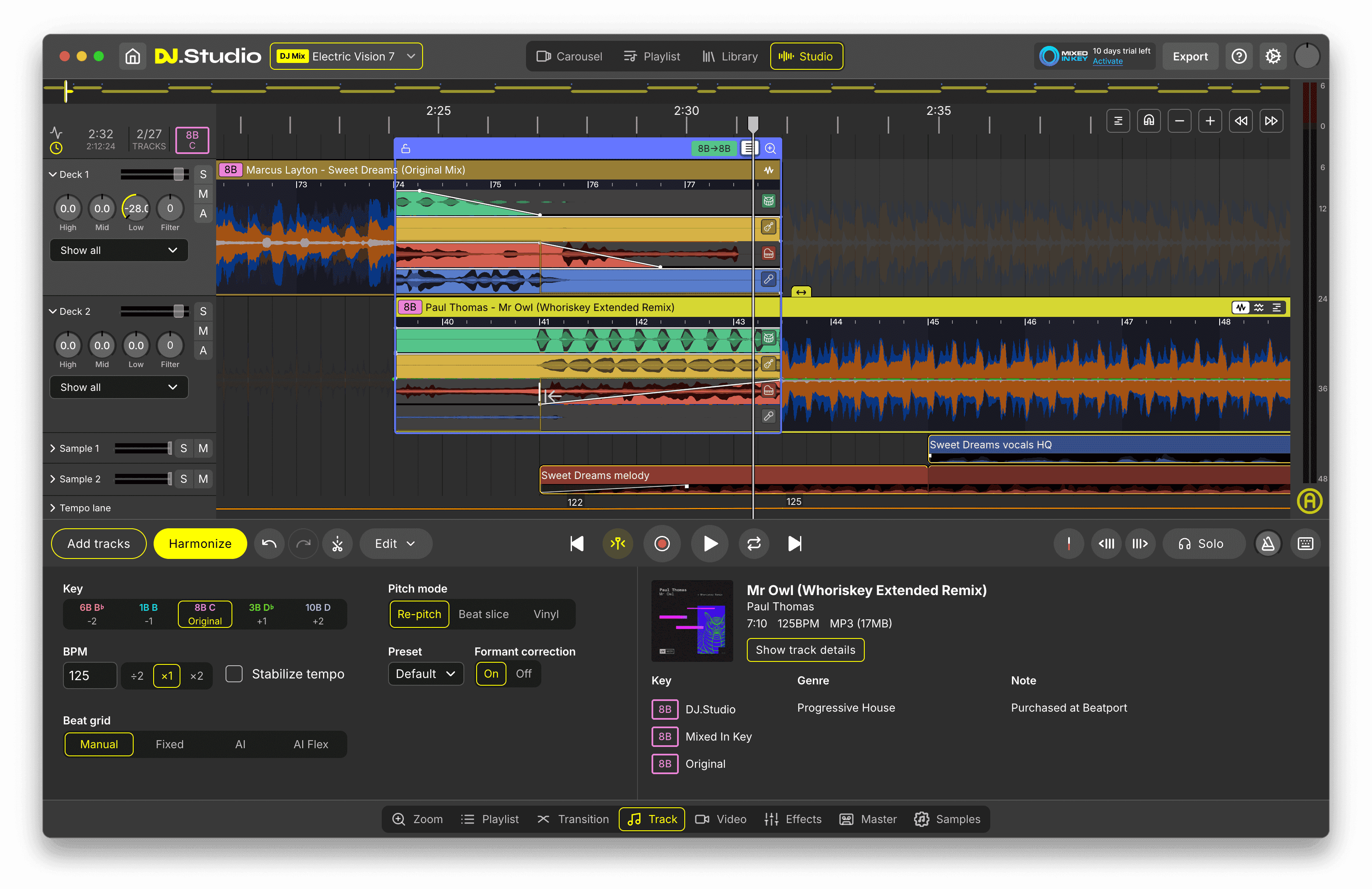
Made for DJs who want to learn, build and finish mixes before performing live.
Works with libraries from rekordbox, Serato, Traktor, VirtualDJ and more.







360,000+ DJs
Worldwide community

Why DJ.Studio
Why build bedroom DJ mixes with DJ.Studio
Turn home practice into finished DJ mixes
Bedroom DJing often starts with playlists, favorite tracks and curiosity. The hard part is turning those ideas into a mix that actually flows. DJ.Studio gives you a visual timeline where you can build a real set from start to finish, instead of guessing inside a flat playlist.
Learn transitions without live pressure
You do not need to nail every blend in one live recording. Use DJ.Studio to slow the process down, inspect the overlap between tracks, adjust timing, fix awkward BPM changes and understand why one transition works better than another.
Create more than just practice sessions
A bedroom DJ mix can become a private training file, a radio-style set, a Mixcloud upload, a YouTube video mix or a preparation project for future live performance. DJ.Studio supports that full path with audio export, video export, auto-generated tracklists and direct publishing options.
Build your first bedroom DJ mix
Arrange tracks, shape transitions and export a finished mix from home.
Workflow
How bedroom DJ mix creation works in DJ.Studio
Four steps from the tracks you love to a finished mix you can export from home.
Start with music you already like
Begin with tracks from your local library, DJ library, Apple Music library, Beatport previews or a Spotify playlist conversion workflow. Use DJ.Studio to collect ideas into a project before deciding what belongs in the final mix.
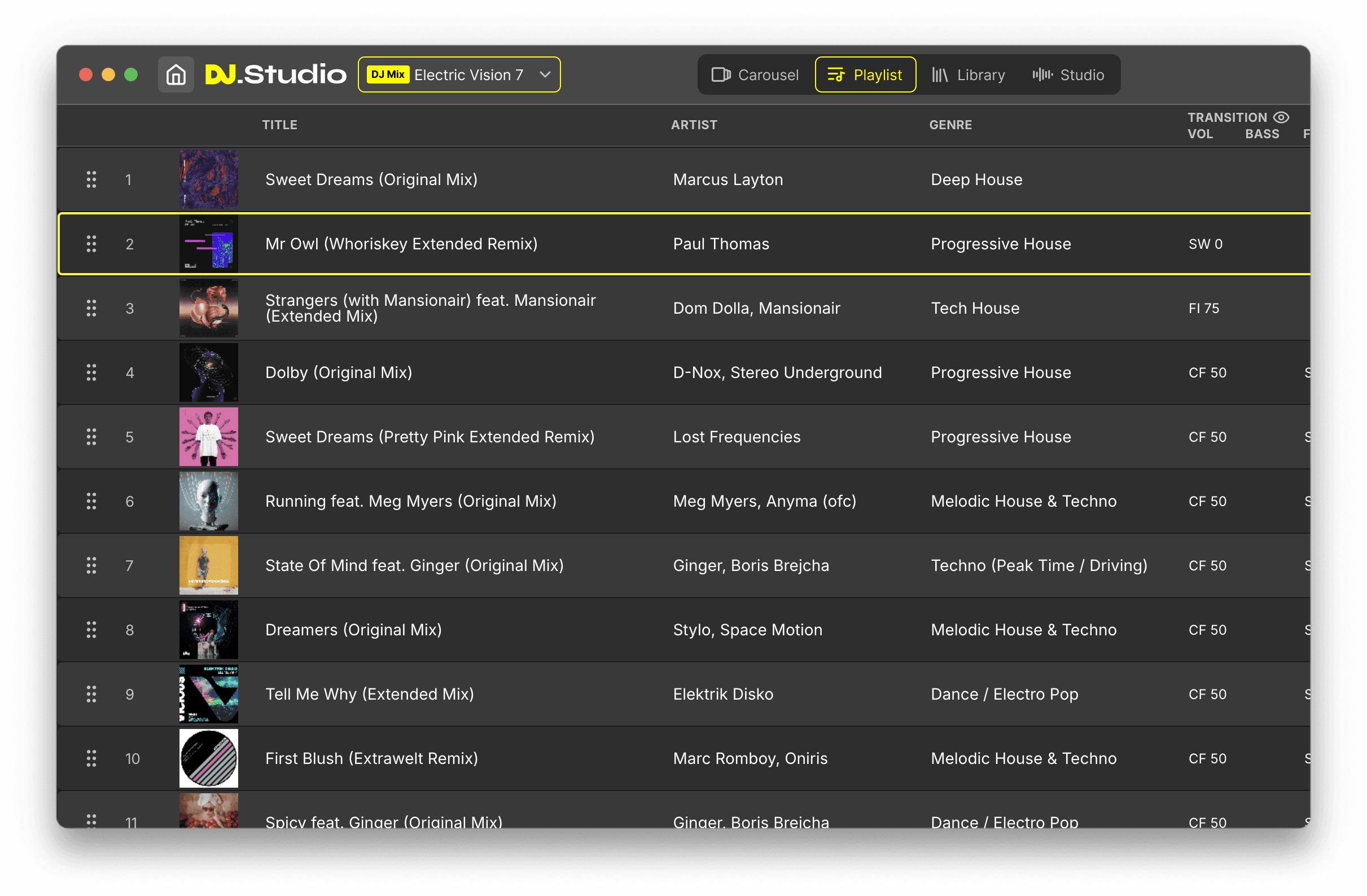
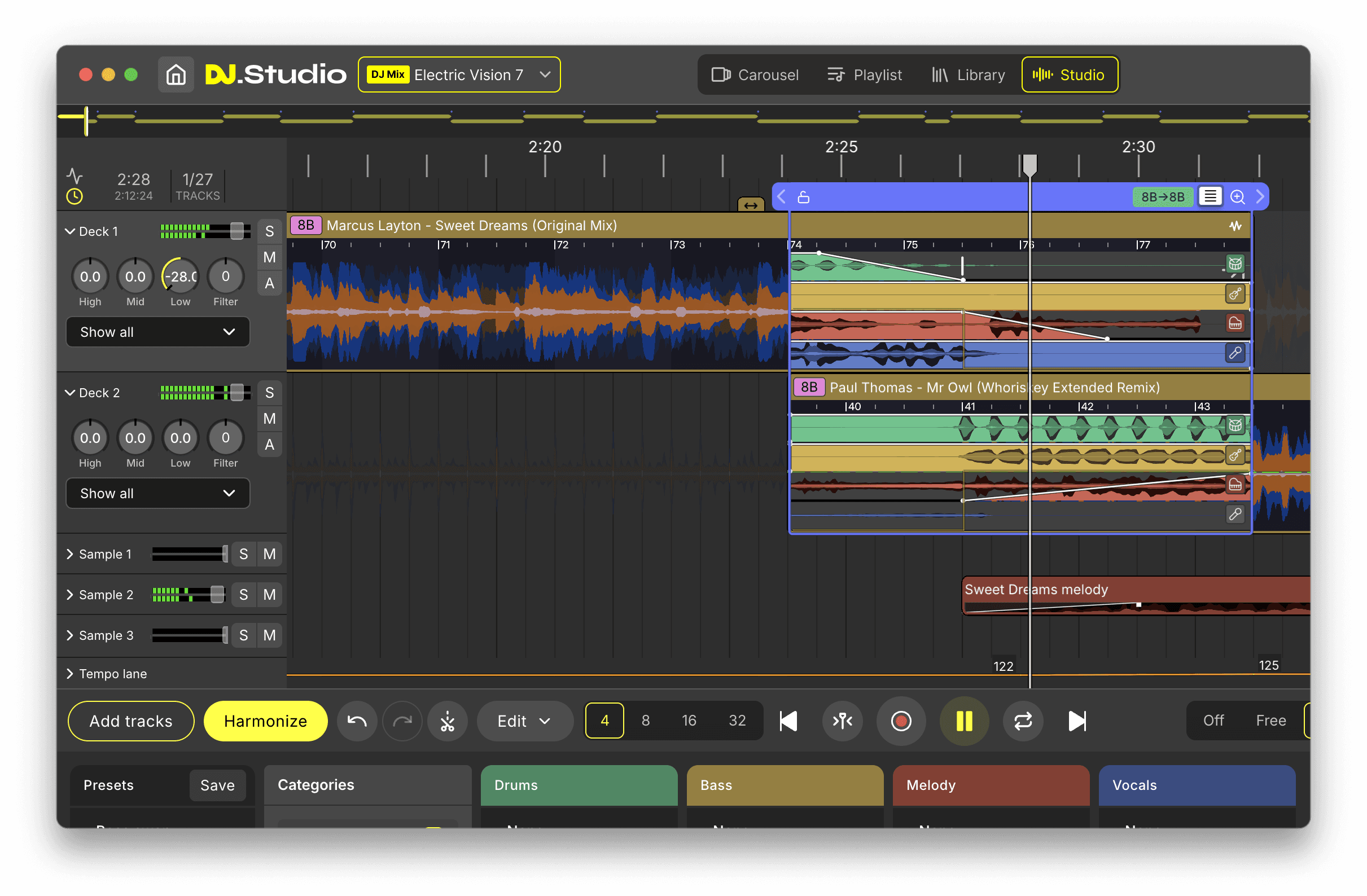
Build the mix on a visual timeline
Place tracks in order, trim sections, adjust starts and endings, and see the entire mix as one continuous structure. This is where bedroom DJs learn how a set develops, not just which tracks they like.
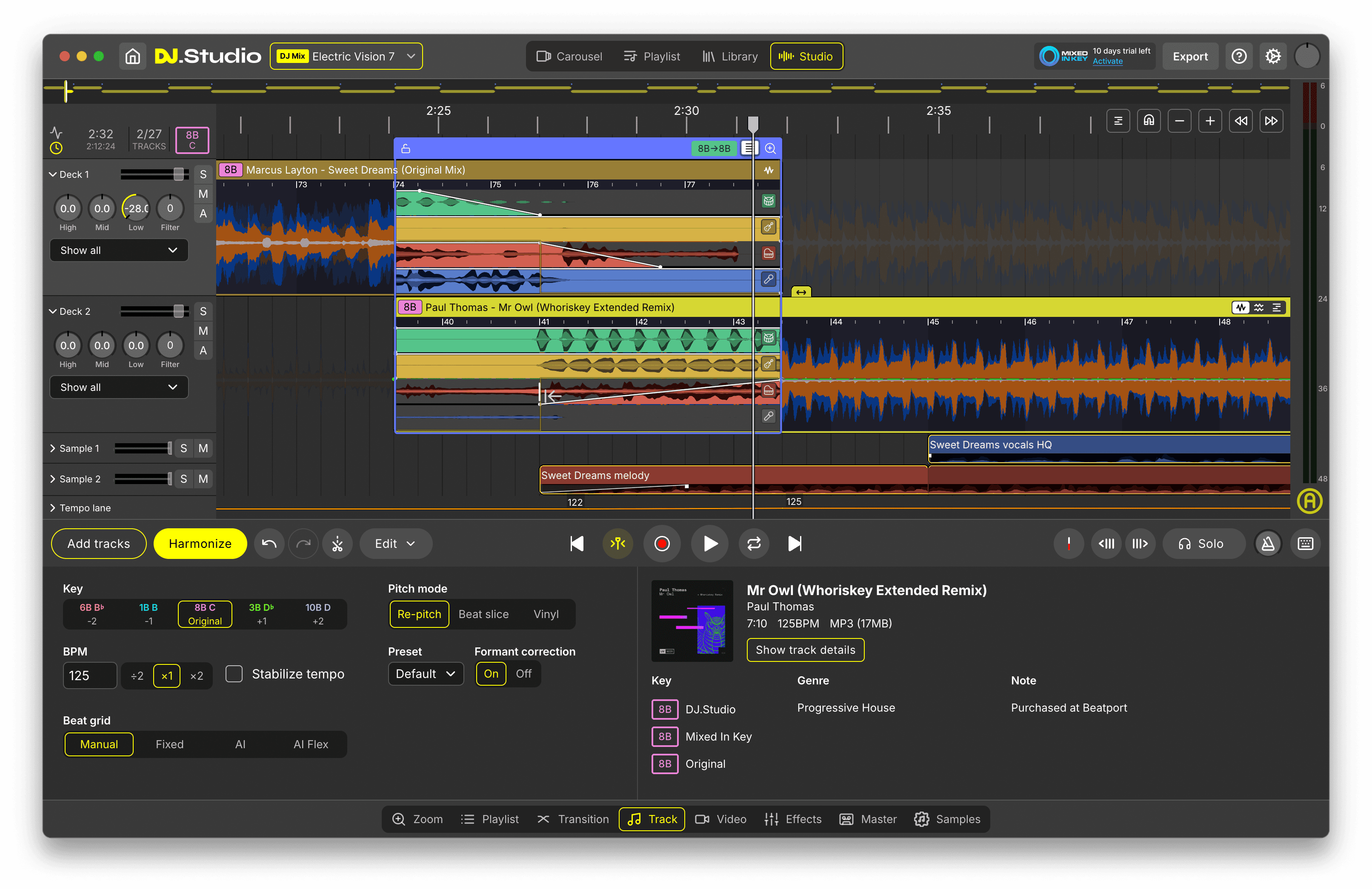
Improve the transitions
Open the Transition Editor to shape the overlap between tracks. Adjust fades, EQ-style movement, effects, volume curves, stem-level blends and timing. Use Harmonize, harmonic match indicators, BPM tools and key adjustment to make smoother decisions before exporting.
Export, share or keep practicing
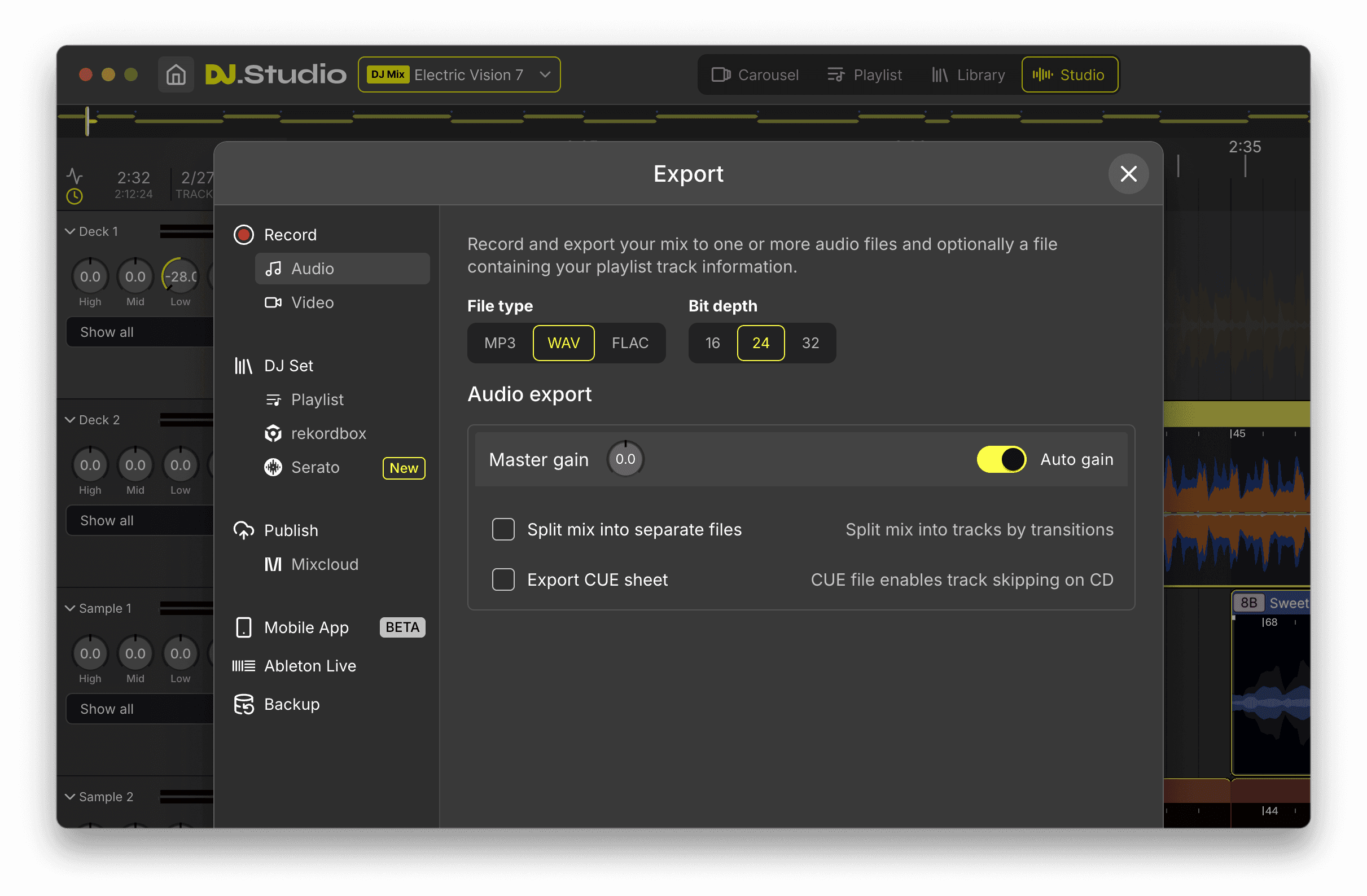
Export your mix as WAV, MP3 or FLAC, create a video mix, generate a tracklist, upload to Mixcloud or prepare a playlist for another DJ workflow. Bedroom practice becomes much more useful when it produces something you can replay, review, share or improve.
Make your bedroom mix real
Build the idea, refine the flow and export when it feels ready.
Features
Features that help bedroom DJs build better mixes
Timeline-Based Mix Editor
See your full mix visually and edit it without performing everything live.
Harmonize
Get a smart starting order based on BPM and harmonic key, then refine it yourself.
Transition Editor
Shape each crossover with fades, EQ movement, effects, volume curves and stem-level control.
Stem Separation
Use vocals, drums, bass and melody elements creatively during transitions or edits.
Mashup Mode
Layer tracks together to create bootlegs, acapella blends and multi-track ideas.
Sample Lanes
Add DJ drops, jingles, risers, one-shots or radio-style elements at precise moments.
Input Lane
Record spoken intros, voice-overs or radio-style commentary directly inside your mix.
Auto-Generated Tracklists
Create formatted tracklists with artist names, titles and timestamps.
Audio and Video Export
Export finished mixes as audio files or MP4 video content for sharing and review.
Use cases
Bedroom DJ workflows you can build with DJ.Studio
First bedroom DJ mix
Start with a small playlist and learn how tracks connect. The timeline helps you understand structure, timing and energy without needing to master a controller immediately.
House music practice
House mixing is about phrasing, groove, energy and smooth progression. DJ.Studio helps you test long blends, key movement and tempo changes before recording or performing.
Radio-style bedroom sets
Use Input Lane, Sample Lanes, tracklists and direct Mixcloud upload to build a complete radio-style mix from home. This is ideal for DJs who want to create shows, not just raw practice recordings.
Creative edits and mashups
Use stems, Mashup Mode, effects and automation to create blends that go beyond simple track-to-track mixing. This gives bedroom DJs a creative reason to keep experimenting.
Controller-free preparation
You can learn a lot about track order, timing and transition design before buying a controller. DJ.Studio gives you a serious software workflow from a laptop or desktop.
From home practice to live DJ setup
Prepare your mix idea in DJ.Studio, then move playlists or prepared material into rekordbox, Serato, Traktor, VirtualDJ or Engine DJ when you are ready to perform live.
Start your bedroom DJ workflow
Practice at home, build real mixes and grow into your next DJ setup.
Comparison
How DJ.Studio compares for bedroom DJs
DJ.Studio is strongest when you want to build, edit and export a DJ mix from home. Live DJ software is stronger for real-time performance, and DAWs are powerful for production but less direct for DJ-style mix planning.
Build a full DJ mix on a visual timeline
Prepare a mix without performing it in real time
Use BPM and harmonic key to shape flow
Edit individual transitions in detail
Use stems inside transitions or edits
Create mashups and layered blends
Record voice-overs inside a prepared mix
Add drops, jingles or samples
Export a finished audio mix (WAV, MP3, FLAC)
Export MP4 video mixes
Generate tracklists and timestamps
Upload directly to Mixcloud
Prepare playlists for live DJ software
Perform live with DJ hardware
DJ.Studio is strongest for building, editing and exporting bedroom DJ mixes before performance. Live DJ software is stronger for real-time deck mixing and hardware control, and DAWs are powerful for production but less direct for DJ-style mix preparation.
Is this for you?
Built for bedroom DJ mix creation, practice and preparation
DJ.Studio is made for the creative preparation side of bedroom DJing. Use it to build mixes, test transitions, arrange tracks, create edits, record voice elements and export finished sets from a laptop or desktop workflow, before sharing, reviewing or preparing for a future live setup.
Best for
- Building full DJ mixes at home and bedroom DJ practice
- Learning track flow and mix structure
- Testing transitions before recording or performing
- Creating house, disco, electronic or open-format mixes
- Making radio-style mixes with voice-overs, drops or jingles
- Experimenting with stems, edits and mashups
- Exporting audio mixes, video mixes and tracklists
- Preparing playlists for rekordbox, Serato, Traktor, VirtualDJ or Engine DJ
Not for
- Live DJ performance in front of a crowd
- Real-time deck mixing during a live set
- Controlling DJ controllers, CDJs, XDJs or hardware mixers
- Replacing rekordbox, Serato, Traktor, VirtualDJ or Engine DJ during performance
- Cueing, beatmatching and track switching as a live deck system
- Responding to crowd energy in real time during a gig
- MIDI mapping or hardware performance control
- Running a full live DJ booth from one application
- Phone-only or tablet-only DJ performance
- Streaming a live DJ set directly to an audience
Build, refine and export your bedroom DJ mix with DJ.Studio’s timeline-based workflow.
Social proof
A clearer way to build mixes before you perform
Bedroom DJs often learn faster when they can see the mix, not just hear mistakes after recording. DJ.Studio gives you a structured environment for arranging tracks, designing transitions, experimenting creatively and exporting a finished result.
Used by DJs worldwide · Reviewed by creators and producers · Award-winning DJ mix software
FAQ
Frequently asked questions
A bedroom DJ is someone who practices DJing from home. Bedroom DJs often build mixes, organize music, learn transitions, create radio-style sets or prepare before playing live.
Yes. DJ.Studio fits bedroom DJs who want to build mixes, test transitions, create edits and export finished sets from a visual timeline.
No. DJ.Studio is not live performance software. It is designed for planning, editing, creating and exporting DJ mixes before live performance.
No. DJ.Studio does not replace live DJ software during performance. It works best as a preparation and mix creation tool alongside those platforms.
A basic bedroom DJ setup can include a laptop, headphones, music library, small speakers and sometimes a DJ controller. DJ.Studio handles the mix-building software workflow, not the physical sound system.
No. You can start learning track flow, mix structure and transition design with software first. A controller can help later, but it is not required to build your first mix in DJ.Studio.
Yes. DJ.Studio lets you build a mix on a timeline instead of performing every transition in one live take. That makes it useful for learning, editing and exporting polished mixes.
Yes. DJ.Studio includes tools for voice recording, samples, tracklists and Mixcloud upload, making it useful for radio-style bedroom DJ mixes.
Yes. You can use Input Lane for voice recording and Sample Lanes for drops, jingles, risers or other extra audio elements.
Yes. DJ.Studio includes Mashup Mode and Stem Separation, which can help you layer vocals, instrumentals and track elements into creative blends.
Yes, DJ.Studio can create projects from Spotify playlists through a matching and preview workflow, but you need properly available or purchased tracks before export.
Yes. DJ.Studio is useful for beginners because it makes the structure of a mix visible. You can learn how tracks connect before trying to perform every move live.
Build your bedroom DJ mixin DJ.Studio
Start with tracks you love, arrange them on a visual timeline, improve the transitions and export a mix you can actually listen back to, share or prepare for live performance.
Free trial available. No credit card required.
Practice at home. Finish real mixes.