7 days free, no credit card
Merge songs into one seamless mix
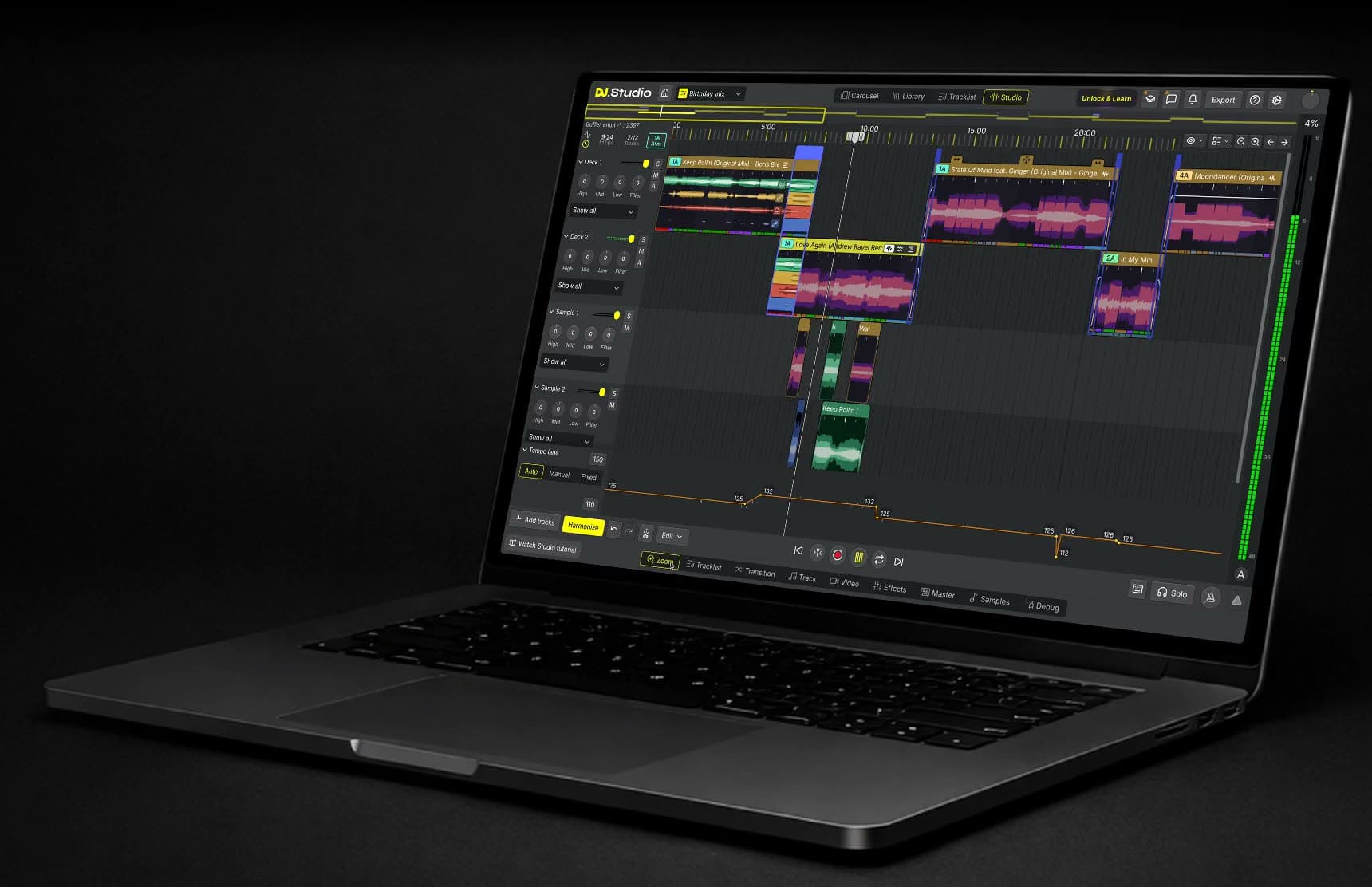
DJ.Studio is DJ software for Windows and macOS that merges songs into one continuous mix. You add two or more songs to a timeline, DJ.Studio lines up their tempo and key, and you shape the transition where one song runs into the next. The result sounds like one track, without a gap or a hard cut.
Merge songs or join MP3 files?
To merge songs is to turn several tracks into one piece of audio. A file joiner does that by placing one song after the other, so you hear a gap or a hard cut where they meet. A DJ mix does it by overlapping the end of one song with the start of the next, at the same tempo, so the change is hard to hear. DJ.Studio works the second way. Every song sits on one timeline, every overlap is a transition you can see and edit, and the finished mix becomes a single file.
How to merge songs in three steps
Merging songs in DJ.Studio takes three steps, all on one timeline. Your original audio files never change.
- Add your songs: your own files, or tracks from your rekordbox, Serato, or iTunes library.
- Let Harmonize line them up: the DJ.Studio playlist engine checks BPM and key and places a transition between every pair.
- Export one file: MP3, WAV, FLAC, or video, once you have a license.
Match tempo and key before you merge
Two songs only merge smoothly when their beats line up. DJ.Studio analyzes the BPM and key of every song you add and time-stretches the songs, so the beats stay in sync while one song runs into the next.
Key matters too. Songs in compatible keys blend without clashing notes, so the overlap sounds like one piece of music. Our Camelot wheel chart shows which keys mix well together.
Blend the songs, don't just join them
A basic song joiner puts one file after the other. DJ.Studio places a transition between the songs instead: a blend where one song fades out while the next one comes in.
Each transition has its own curves for volume, EQ, and filters, plus effects and stem mutes. Start from a preset such as a crossfade or a filter sweep, then adjust it until the change sounds natural. See how DJ transitions work in DJ.Studio.
Combine more than two songs
You aren't limited to two songs. Add a whole playlist and DJ.Studio combines it into one continuous mix, with a transition between every pair. Harmonize can suggest an order by BPM and key, and you can lock the songs that must stay first or last.
That makes it easy to combine songs for a workout mix, a wedding playlist, a radio show, or a dance routine where several songs need to run as one track.
Export one merged file
When the mix sounds right, export it as one audio file in MP3, WAV, or FLAC, or as an MP4 video with reactive visuals. You can also upload it straight to Mixcloud or YouTube with an automatic tracklist, or export it to rekordbox, Serato, VirtualDJ, or djay Pro.
Export needs a paid license. The free trial lets you build and play the whole mix first, so you hear the result before you decide.
We were impressed with the transitions that were automatically generated and the overall sequencing of the mixes (DJs can create their own manual transitions as well).
Online song mergers compared with DJ.Studio
If you only need to glue files together, a free online merger or an MP3 joiner is enough. Our guide to MP3 merger software compares those tools. DJ.Studio is paid desktop software for when the transition between your songs has to sound right.
Feature | Online song merger | DJ.Studio |
Price | Usually free | 7-day free trial, then paid |
Where it runs | In a browser | Desktop app for Windows and macOS |
Tempo and key matching | Rarely | Yes, for every song |
Transition between songs | Fade or cut | Editable curves for volume, EQ, filters, and effects |
Number of songs | Usually a few | A whole playlist |
Export | Usually MP3 or WAV | MP3, WAV, FLAC, or video (paid license) |
Want to learn the techniques?
Prefer to learn how a DJ blends two songs by hand? Our guide to mixing two songs together walks through eight DJ transition techniques, step by step.
Every one of those moves can be rebuilt in the DJ.Studio transition editor, with lanes for volume, EQ, filters, and effects. That makes it a good place to practice: change one curve, play the blend again, and hear what it does.
It’s a welcome tool for any DJ or production studio and can create mixes fast, leaving you to concentrate on the creative part.
What you need
DJ.Studio runs on Windows and macOS. Check the system requirements before you start.
You don't need a controller or a DAW: you merge songs with a mouse and keyboard on the timeline. You can try DJ.Studio free for 7 days, without a credit card.
After the trial, you choose a one-time license with 12 months of updates or a monthly plan. All options are on the pricing page.
Frequently asked questions
- How do I merge two songs into one?
Add both songs to the DJ.Studio timeline, let it match their tempo and key, set the transition between them, and export the mix as one file. Exporting needs a paid license.
- Can I merge songs for free?
You can try DJ.Studio free for 7 days, without a credit card, and build and play your mix in that time. Exporting the merged file needs a paid license. DJ.Studio is a desktop app for Windows and macOS.
- What is the difference between merging and mixing songs?
Merging often means joining files end to end. Mixing blends them with a transition, so you don't hear the change in tempo and key. DJ.Studio does the second.
- Can I combine more than two songs?
Yes. Add as many songs as you like, and DJ.Studio builds one mix with a transition between every pair.
- Which file formats can I export?
MP3, WAV, and FLAC for audio, and MP4 for video.
- Do I need a controller?
No. You build the mix with a mouse and keyboard on the timeline.